
Important Contacts & Links
The buttons below will prompt you to call/text the number, so be wary before clicking!
All numbers are official from their respective websites; disregard the regular orange-star signifier for this page only.
Public Safety
Student Health Center
Tickets & Housing
NTID & Deaf Community
Mental Health Hotlines
Counseling & Support
Parking & Transportation
Finanical Aid
Career & Campus Work
Campus Maps
Student-Made & Official Maps of campus and its tunnels. Various maps and plans are behind RIT login-in for safety.
Nap Map
Student-Recommended Napping spots on campus! This is a re-design of naps.rit.edu, which is currently inactive/no longer updated as of 2026.
Feel free to send any suggestions for napping spots. Also check out this person's @ritnaps instagram!

Tidbits & Vending Map
Various smaller pieces that students should know! From printing, to vending machines, and much more.
Academics
Class Registration Guide, Schedule Maker, Study Room Reserving, and more.
Class Registration Guide
How to register for your classes! All images are clickable.
To see the succession of course registration in a past year, Click here
1. Accessing SIS & Enrollment Page
Search up sis.rit.edu in your search bar. Click the first link: "Student Info System" and sign into your RIT account.
Once signed in, click "Enroll & Search" to see your enrollment appointment, put classes in your shopping cart, and other things in regarding classes.


2. Appointment & Class Search
First, go to Enrollment Appointments. Here, you can see the span of time that enrollment occurs. When it is around the time for applying to classes, you will see your time slot at the top of the page. Once enrollment appointments are released, you will be given a time where you can enroll in your classes (The red highlight within the pictures)Next, head over to "Class Search & Enroll." Here you can search classes that are available for that semester. It will prompt you to select the term you are looking to apply for, so make sure you take note of that. To start searching, you can either use the basic search bar or click "Additional Ways to Search." If you use the main search bar, use specific major codes to find things that are relevant to your progress: GRDE (Graphic Design), ARTH (Art History), etc.Always check in with your advisor to know the classes you need for that semester to stay on track. Using that information, you can head to the CSH ScheduleMaker to prepare and see options that work.


3. Finding Class Choices
Once you enter in the topic in the search bar, multiple classes will appear for the coming semester with different professors and different times. You can use the filters on the left to slim out options based days as well.Once you click on a class, you will be shown class options– some classes may have more than one section. It also displays the class time, section number, professor(s), and the open seats in the class.Another way to search for classes is through "Additional Ways to Search" which will provide you with ways to select specific classes for specific requirements (General Education, Wellness, etc.)


4. Adding to the Shopping Cart
Once shopping carts open, you can select a class and add it to your shopping cart(Reminder this does not enroll you into the class and is only to choose the classes you want to enter.)You will continue through the next steps and if you want you can select the option to be waitlisted if there are no open seats. Once you accept the addition to your shopping cart, you will be prompted with a validation and details.


5. Validating your classes
To check if your schedule works for the semester, head to the Shopping cart and select all the classes you chose. Click "Validate" and it will give you a brief of whether your classes work or not.If it doesn't, you will recieve an X marked next to the class does not fit and with details of why it may not fit.


6. Submitting your classes
Once your enrollment time has arrived, you will go to the shopping cart and select the classes you want to enroll in. You will then click "Enroll" and you will be enrolled into the classes that work.
If any of your classes are rejected (the page you are taken to after clicking "Enroll" with explain), it will provide an explanation as to why.


Reasons why a class enrollment may fail:
Unable to enroll due to the lack of available seats. These seats may be reserved for the major, minor, graduates, or those with accommodations like interpreters.
Not meeting a prerequisite for the class you chose. Some classes require you to take other classes beforehand.
The class is full and the waitlist is full (if you have chosen to apply to the waitlist)
Your class conflicts with another class in your schedule.
You've already enrolled in the class.
Modifying your Schedule
If you dislike a part of your schedule, always discuss your changes with your academic advisor.Dropping, Switching, or Adding classes may affect your academic path; talk before taking action.
Viewing your Schedule
After you've made your schedule, you can head over to TigerCenter to see what it looks like on a calendar. TigerCenter also gives you the ability to download the calendar so you can upload it to Google Calendar or any equivalent.
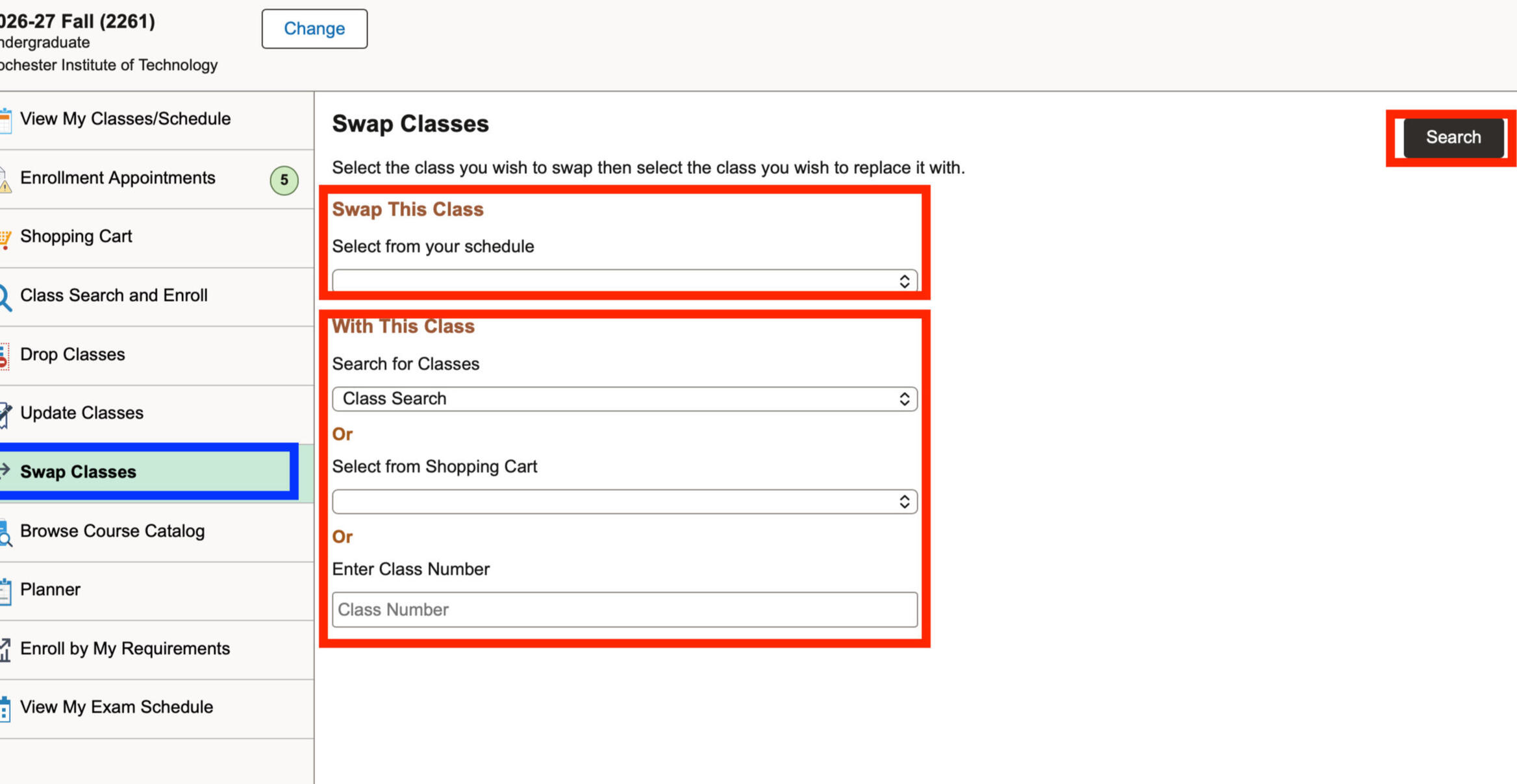
Swap Class Function
The class swap function is good to use when you are actively on waitlist for another class and would rather not risk dropping a class to make space for the waitlisted one.At the time you enroll, before joining a waitlist you can go to the swap tab and set up the swap function for a class you're currently enrolled in.Once you are through the waitlist and accepted for the class, the class will automatically switch out.
Community & Social
Welcome to the RIT community! Here are some of the places to connect with students, parents, and RIT itself.
There is also a section of interesting RIT-related content and a link to learning words/phrases in ASL (not RIT affiliated).
NTID & The Deaf Community
RIT has an institute of the Deaf students, Hard-Of-Hearing students, and Interpreting Majors called the National Technical Institute for the Deaf. NTID is located on the dormside and is the first and largest technological college in the world for students who are deaf or hard of hearing. On campus, you will encounter Deaf people, and its important to learn about the Deaf Community.
(This page was fact-checked by a Deaf individual. Some of these tips may not apply to the entire Deaf community.)
| Deaf, Hard of Hearing, & Language |
|---|
| A Hard-of-Hearing person is an individual who has a form of hearing-loss and communicates primarily through oral language. |
| A Deaf Person is an individual who has partial or total hearing loss and primarily relies on visual communication (Sign Language, Lip-reading…). |
| Neither of these words are the same thing and both have a place in Deaf culture. Be mindful of these, and that not all people use the same communication forms. Not all Deaf/HoH folks sign. Not all Deaf/HoH folks read lips. Not all of them use hearing tools. There is no standard as to what a Deaf person uses to communicate with other people. |
| American Sign Language |
|---|
| American Sign Language (ASL) is a visual language with its own grammar and syntax, used primarily by deaf and hard-of-hearing communities who speak American-English. Although it uses english words, it does not have the same grammar structures. |
| "Can we go to the store?" can become "Go store, can?" because words like 'to' or 'the' do not get used or phrases we are used to are broken down for ease and clarity. When you use connecting words like that or in an english-word order, it can be considered Signed Exact English or Pidgen Sign Language. If you do use SEE or PSL, most Deaf individuals will adjust so they can communicate with you. Learning sign can be complex, but all efforts to connect with Deaf folks are appreciated. |
| Where do I learn sign language? |
|---|
| The best way to learn sign language is through Deaf people and Deaf resources like Lifeprint. |
| At RIT, a good way to learn American Sign Language is at No Voice Zone, which is a club which meets each week for people to sign with one another. Whether you're a novice or a native speaker, there is a level for you to learn at. |
| Avoid learning from Hearing individuals when you can. If you do learn signs from hearing folks, always fact-check and ensure they have experience (An Interpreter, CODA, etc.) |
| Communication & Interpreters |
|---|
| Always treat Deaf people with respect. If they have an interpreter, don't talk to/watch the interpreter. Speak to the Deaf person because that's the person who is talking. |
| When you want to get someone's attention when signing is to do a slight hand wave in their line of sight. Not in their face and not by clapping/snapping (they can't hear you). Other ways to get someone's attention. |
| A sign I learned from one Deaf individual is different from another person's. Why? |
|---|
| Just like any other language, it has cultural and regional accent or adaptations. It's similar to how people in the Midwest say "Pop" and the people in the South say "Coke." Sometimes certain signs change overtime and based on the community an individual grows up in. |
| What is a sign name? |
|---|
| Name signs are specifically and only given by Deaf signers only. A name sign often is only given to those who become very significant/involved in the Deaf community or have a significant presence (Presidents, Activists, Singers/Artists, etc) in human culture. You cannot give yourself a sign name. |
| How do I voice-speak to a Deaf individual? |
|---|
| If you don't know enough sign to understand a conversation, there are important things to remember when you speak to someone if they can lip-read. |
| Keep your face/mouth uncovered while speaking. Speak facing directly at the Deaf individual you are speaking to. Don't raise your voice or speak slower. Just talk normally and clearly. |
| If I don't know sign, what is a quick way to speak to a Deaf individual? |
|---|
| A good alternative way of communication is using a notes app or text app on your phone, like Make it Big. These apps make it easier for clear back-and-forth, but it is strongly encouraged to learn sign! It could be useful in the future or your career. Inclusivity in any space is very important to keep in mind. |
| How do I make a Deaf friend feel included in the group? |
|---|
| Include them in conversations, tasks, or activities when possible. Learn some sign to help a communicate a bit easier and encourage other group members to learn sign too. Sometimes Deaf folks in majors get sectioned together because of interpreter or captioning shortages. Engage with them on your own time too. |
| My Deaf Neighbor is loud. How do I deal with this? |
|---|
| Deaf people can't hear the volume of the actions or sounds they make, so sometimes you may hear others in the hallway or the room next door. This scenario is almost the same as any: head over to the room, ring the light bell or approach the person/group and ask them if they can keep it down. But, in this situation, tell them what made the noise. This reduces confusion on their end as to what they were doing that was so loud. |
| Interpreting rules |
|---|
| Don't interpret unless asked by the Deaf person. In small get-togethers with a range of different hearing statuses, a Deaf individual may struggle to follow what is being said (this is called Dinner Table Syndrome). If a Deaf individual asks you what people are saying, you can interpret if you feel confident enough. |
| Never professionally interpret for Deaf people in situations of Law, Academic, or Medical need unless you are certified. In these cases, an experienced interpreter is needed to quickly understand the Deaf individual and translate. |
| Distractions & being Direct |
|---|
| When it comes to the phone ringing, the lights buzzing, or chattering outside, let your Deaf friend know if you react to the sound. It keeps them in the loop about their surroundings and why you may have gotten distracted during a conversation. |
| Deaf people in their culture are known to be very direct with their discussions; whether its about them going to the bathroom or what work they were doing for class, they will tell you. You don't have to be the same way for things you aren't comfortable with, but try to be direct when possible. |
Interesting Websites & Things at RIT
Cool websites, student content, interesting history, and lots more. Depending on the time of year, some sites may be down.
RIT Discords
All RIT discords are community built, primarily by active students and alumni!
Some majors also have their own servers, sometimes run by professors.
Housing
RIT provides various housing locations, but there are also some off-campus too! Here's almost everything you need to know about living at RIT.
Special Interest Housing & Honors Program
The set-ups of Special Interest housing in Residence halls.
All houses have off-floor memberships if you are unable to be on-floor.
Housing Types & Layouts
Collection of descriptions, general information, and features, along with imagery for better understanding of housing spaces to live in. All room numbers and specifics are removed for the safety of students. Note: Some housing is Upperclassmen-only.
175 Jefferson
175 Jefferson is similar to RIT Inn, however it is on campus property. They are all single-bedrooms with a bathroom.
Features: Furnished, Microfridge, TV, Pool. Laundry appliances on first floor, No kitchen, Cannot park on-campus. Meal Plan Required.
Read more →
Housing Comparison Sheet →

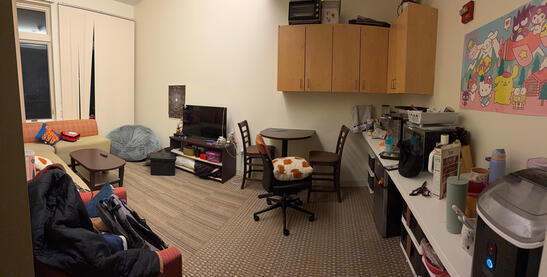
Global Village Living Room Only
The image shows a shared living space commonly found in Global Village apartments, which may include singles and doubles.
In Global Village apartments, residents share communal living areas. Some units include full kitchens, while others do not. Units without kitchens are typically provided with a microfridge, counter space, and storage cabinets.
Read more →
Housing Comparison Sheet →
Advice
Compiled advice and content that is grouped together across RIT sites or the student community.
Safety Tips
Tips to stay safe on Campus and now that you're independent!
| Add Important Contacts |
|---|
| In your phone contacts, add the numbers of public safety and hotlines for easy access. You can find some of them here. |
| Always keep an ear out |
|---|
| For those who use headphones walking alone, always keep one out or noise-cancellation off to ensure no one catches you off guard. It's also good to take a few moments while walking to look around yourself. |
| Stick with groups |
|---|
| Having people to walk with can be helpful to increase safety. It can also be useful to walk nearby groups of people too if you don't have someone. |
| Location updates with Family & Friends |
|---|
| When walking around or going out at night, sharing your location with friends or family can be very useful to keep yourself safe. Always do this with people you trust, and a commonly used app among friends is Life360. If you don't feel comfortable using apps, just make plans with others if you don't get back at a certain time. |
| Stay on lighted paths |
|---|
| Some paths on campus are darker or emptier than others. The Quarter Mile and middle of campus is the safest spaces, so it is good to plan walks across those paths. |
Incoming FAQ
The answers, links, and so on to the popular questions incoming students ask. If you have a question that is unanswered, feel free to ask online.
| Can I cook in dorms? |
|---|
| No, the ability to cook & access to kitchens do not exist in dorms unless you have accommodations by a dietitian. Even with kitchen access, you still need to have a dining plan. You cannot opt out of the dining plan when living in dorms. |
| Can I bring something to cook with? |
|---|
| No, you cannot bring any cooking appliances to keep in your dorm other than an auto-shutoff coffee/tea maker. All other items, like hot plates, air fryers, or toasters cannot be in dorm rooms even if they have automatic shutoff. |
| How do housing appointments work? |
|---|
| Everyone is lined up for selection based on the date of deposit, any notable accommodations, and certain statuses (Special Interest, Honors, etc.) |
| You will be emailed an appointment time in late may to early June to select your housing. Once it is time to select housing, you (or group leader) enters into the myLife portal and selects a room/rooms. |
| What happens if I don't do my housing contract? |
|---|
| If you don't do your contract, you will be unable to self-select for housing. RIT will choose your space and roommate(s) for you.If you want to find a roommate yourself, you can do it via the myLife, RIT discords (there is often an incoming one each year), and Zeemee. |
| What are the best dorms? |
|---|
| They are basically all equal. You will get opinionated recommendations when you ask this based on experiences (which most people only live in one dorm during their time in residence halls). There is not necessarily one "perfect" housing situation, because amenities vary. Check out the housing comparison sheet to help you out. |
| What happens to my room over breaks? |
|---|
| It will stay untouched over small breaks + winter break, but you are required to move out for the summer. If you decide to leave your car over the fall, winter, and spring breaks, be sure to secure the vehicle. Occasionally we experience break-ins, but infrequently. If you leave your car for long periods of time, be sure to test all parts on first use when you are back. Make sure to follow the proper regulations for keeping things in your dorm room (unplugging electronics, shutting windows, and securing expensive items). |
| Should I be worried about my items and the Fire Marshall? |
|---|
| Although RIT has a bit of control over the things in your dorms, you also have some leeway. If you own a container in your space (so something that isn’t formally owned by RIT— they include the backpacks you may receive as an acceptance gift as something they own) they cannot check it without your consent or without probable cause. |
| Can I stay at RIT for breaks? |
|---|
| Yes, and at no charge (except summer break). |
| Campus gets really quiet over long breaks and most places will not be open. If you plan to stay on campus, make sure you have stored enough food to tie you over. Dining places, most academic buildings, and the bus systems do pause temporarily over breaks or have modified hours. This applies to almost all breaks. |
| What isn't allowed in dorms: |
|---|
| No Substances (Alcohol, Weed, Smoking, etc.) |
| No Pets (Only Approved ESAs and Fish) |
| No modifying or taking out RIT furniture |
| No heating pads, tapestries, window covers, or ceiling attachments |
| No cooking appliances besides auto-shutoff beverage appliance |
| What should I buy for my dorm? |
|---|
| A Move-in checklist for the basic necessities. |
| And before you ask... no. You don't need a printer. Most colleges have their own and DSP has a free printer (but there is a paper limit). |
| Is Special Interest or Honors housing worth it? |
|---|
| It really can depend on the person whether it is worth it, but they have big perks. There is a membership attached to all the special interest houses to continue funding their supplies and resources. Honors housing and its program can benefit you in your academic career. |
| What do I do if I have a problem with my roommate? |
|---|
| First, talk to an RA or Ombuds to see if there is a way to remedy the situation. If not, you are able to talk to the housing office and swap spaces if there are any available. Always attempt communicating with your roommate first; moving into another room can be often tedious work during a semester. |
| How/Where do I do my laundry? |
|---|
| Dormside laundry rooms are found in the Tunnels. |
| It is not uncommon for students to dump other’s laundry when it's been sitting in a machine for a long time. Due to this, you need to set alarms to change out or retrieve your laundry ASAP. |
| DO NOT USE TIDE PODS OR BEADED LAUNDRY DETERGENT! |
| How do I mail things to my dorm? |
|---|
| The mail system at RIT is 3 places for deliveries— the DSP Mail Office on dormside, one at RIT Inn, and the GV Mail office near Global Village. You will send your mail to the closest mailroom. |
| The format in which you send mail to your dorm can be found here. |
| Can I bring my car to campus? |
|---|
| Yes, but you must purchase a parking permit for the semester or year and can only park in certain parking lots. For the dorms, you can only park in lots B & K. Those living in Residence Hall A, Kate Gleason, and Frances Baker are allowed to park in lot C. |
| What health supplies should I pack? |
|---|
| The good basics: A small medkit, pain/fever relievers, stomach relievers, electrolyte stir-ins for water, and ice packs. |
| Also bring your health insurance card. |
| What happens if I run out of dining dollars & swipes? |
|---|
| You can add more money to your dining card using Tigerspend if you run out. To do this, you can do it online via the Tigerspend website or you can go to one of the orange kiosks near some dining establishments on-campus. |
| Do I get my dining dollars & swipes refunded to me? |
|---|
| No, you will not be refunded any of the dining money you do not use by the end of the academic year. It will all be forfeited to RIT. This is why many students pick the basic Roar plan; you can put the money you need into your dining account, but you can never take it out. |
| How do I select classes for my first semester? |
|---|
| You do not select your classes first semester, your advisor does so for you. In June, you will receive an email from your advisor to provide any preferences you may have that they can attempt to fulfill. After first semester, it is up to you to do your own classes. A guide can be found here. |
| What do I do if there's a class I don't like on my schedule when I recieve it? |
|---|
| Always, ALWAYS talk to your academic advisor first. NEVER change a class on your own without the advice of that advisor. The class choices you get your first semester typically are to fill a specific requirement, so you need to make sure the new class fills that same requirement or another requirement in the sequence. |
| Can I skip Orientation Events if I don't want to go or need a break? |
|---|
| Yes, you can skip some events for Orientation Week; it can be a lot of some students. If you want to pass on one of your events with the RA/OL, communicate that. |
| There are some required parts of Orientation: The Kick-Off, College Connection Days, Residence Hall Meeting, and New Student Convocation. It is encouraged to go to other events and especially Connect & Serve. |
| Should I bring my passport? |
|---|
| Yes, it is in your best interest to do so, especially when traveling back home for breaks on planes. |
| Many students also travel up into Canada with friends, which you will need your passport. |
| What do I buy for the Rochester's winters? |
|---|
| For you: Layered windbreaker jacket, winter boots, gloves, and hat/scarf. If you're from warmer climates, make sure these items are well-insulated, since it gets very cold and very windy. |
| For your car: Anti-freeze windshield fluid, snow-brush+scraper, jumper cables, a mini shovel, and some reusable heating packets. |
| Is there an ATM on-campus? |
|---|
| Yes, we have 2 general ATMs on campus, one in Eastman and another at Midnight Oil. We also have an Advantage Federal Credit Union office. |
| What is the drinking culture here? |
|---|
| Like any university or college, they will have drinking. Reminder that Federally and by RIT Policy, you are not permitted to drink unless you are 21 years old. Do not drink underage. |
| Even so, things happen. If you ever experience or see someone experience Alcohol poisoning, call 911, regardless of your age. See slide 50 of this Guide for more information. |
Apps to Download
These are some of the apps that you might find very useful here at RIT!
Stress Coping Tips
College can sometimes be overwhelming and stressful. You're not alone!
| Get fresh air daily |
|---|
| Go touch some grass! Getting out of a stuffy space like your room is so important for your brain. You often can be so engrossed in class work that you can forget to go out sometimes. Don't forget to take care of you! |
| Don’t be afraid to reach out! People want to help. |
|---|
| Whether it's from online, in-person, or over email, the faculty and professors at RIT want to help you succeed and be well. Please reach to those you feel comfortable with, and don't be afraid to ask a question. |
| Try Getting Off Campus! |
|---|
| RIT campus can feel real isolating. It is difficult to get off, but not impossible. If you have a friend with a car, go even out driving. If you don’t, take the bus to the nearby marketplace to even just walk around shops. Sometimes its nice to see the world beyond and feel grounded. |
| Practice Time Management |
|---|
| College can really push your procrastination tendencies if you have them and not having structured time can burn you out. Develop skills, find resources, and reach out to others to keep yourself accountable. |
| Go Outside, and be Social! |
|---|
| Socialization can play a very important part. Even if it’s just talking with your classmate, RA, or professor, it can do wonders to have some sort of interaction so you aren’t feeling lonely. If you don't want to always talk to people, you can also just sit in spaces among others– social presence can make you feel better as well. Attend events like Bow Wow Wellness or clubs from time to time. Those can help you find people and also get interaction with others. |
| Be Open & Honest |
|---|
| Be honest about how you are feeling with friends, and even professors. Professors want to see you succeed, and they want to help if you are struggling. Many of them went through college and struggled too, so they might have ideas for you. Don't be afraid to express your feelings, especially when you are in a new environment without family. Upperclassmen know how you feel, because they experienced missing their family too. |
| Sleep and Eat! |
|---|
| Sleeping is so important for your brain. Get at least 6+ hours of sleep a night. Your extensive gaming can wait till the weekend; it is not worth sacrificing your sleep. Try your best to eat healthy and get in some food from all groups. Eating too much junk will reflect badly both on your health and your mind. If that’s difficult, just make sure to eat something 3 times a day– if you struggle to get outside to get food, make it a routine for you to go with your roommate or a friend to get lunch or dinner. |
| Establish a professional therapist/support |
|---|
| Having someone to talk to through the challenges is important. Establish a therapist or support that you can talk to, whether it’s through RIT’s CAPS, being referred by the RIT Health center, or otherwise. Although talking to a friend is often helpful, it is not a complete solution. It can easily be difficult and stressful for the other individual, who is also going through their own struggles being away from home. Having a stable routine of talking to someone that can help you does wonders for your mental health. |
College is difficult at times. Just know that you are not alone here at RIT.
If you are struggling mentally – whether you feel like harming yourself or others – call 911 or contact other Mental Health services.RIT faculty and its students care about your wellbeing and safety.
Off Campus Activities
This map has a bunch of student recommendations for you to visit yourself, with friends, or even with family!
Course Recommendations
Collection of Courses recommended by students that are easy or fun. Recorded recommendations come from RIT Maincord.
All recommendations are General Electives or Perspective Electives.
Health & Support
Keep yourself healthy when you're here at RIT, you matter! These are some helpful sites and sources for you.
Physical Wellbeing
Mental Health Supports
Financial Aid
The Financial Aid office is located in the Bausch & Lomb Center and is open from 8:30 to 4:30 on weekdays. Their team is always willing to help and wants to meet their students; if you need anything, go see them! On their main page on RIT's site, they post various reminders and post important notices in the purple box beneath their description.
Queer Resources
Resources for the LGBTQ+ Folks of RIT! You are valid here, and it's important to find resources that can work with you.
Disability Resources
Resources for those with disabilities of RIT! You are valid here, and it's important to find resources that can work with you.
Emergency Evacuation Accommodation
- In Progress, Come back later! -
Incoming Guide
Welcome to RIT! These are parts of the site and a couple informational tidbits to get you started here. Some information is seasonal, so it may not have information until closer to your arrival.
| The Student Checklist |
|---|
| This checklist helps you transition yourself to RIT! Prepare with these steps to ensure you are able to arrive on campus with the tools you need and with confidence. |
| Your Frequent Questions |
|---|
| Plenty of RIT students give faculty and current students the same repetitive questions. Find the answers here to those, but if one of them is not mentioned there, feel free to ask. |
| Join RIT Communities |
|---|
| The preparation for moving to RIT is a long one! Thank goodness we have a summer and some places you can ask questions. Join discords, follow reddit pages, and download Zeemee to help you. |
| Good Advice & Wisdom |
|---|
| The current students have plenty of advice for you regarding your stay here at RIT. Come take a look and grab some of the wise wisdom, along with important applications & more. |
| Important Phone Contacts |
|---|
| If an issue ever arises, you will want to be prepared. Take some of the contacts and put them in your phone for safe keeping and easy access. |
| Housing Guides |
|---|
| Check out the housing page to learn things like layouts, comparisons, and lots more. There is a lot to look at when deciding on where you live in RIT's various dorms. |
| Academics |
|---|
| Although your advisor will be choosing your first semester of classes, its important to start thinking about when you need to select them and where to find your requirements. |
| Move-In Route |
|---|
| When the time comes in August or January (if you come in the spring), you have some things to do before your arrival. Orientation has a specific route for you to take. |
| Orientation |
|---|
| Orientation lasts the full week before classes, with a lot of activities to do. Check the schedule and make sure to attend the required Kick-Off, College Connections, & New Student Convocation. The schedule comes in August. |
Move-In Route
1. Label all bags and boxes with your name and room number from MyLife.2. Print out your "Move-In Dashboard Pass" and other printable resources3. Pick up your key and ID during your move-in time. Residence Halls will check in and pick up in Lots G and H. RIT Inn students will check in and pick up at the front desk of the RIT Inn.4. Drive to your specific move-in area and grab a provided cart to unload! RAs will help guide you to where you need to be. Typically you off-load all your items and a parent drives the car to another lot to park.5. View the orientation schedule on CampusGroups for some of the events going on during the week! Important ones to go to are Orientation Kick off, Academic Days, New Student Convocation, Residence Hall Meeting, and Connect & Serve.


Website Credits
Liam Olson – Creator & Designer of Tigerguides
Specific Resources provided by...
Nathaniel Pellegrino – Housing Cost Comparison
Nina Tacheva – Residence Hall Comparison
Anand Caloh – Display Name Guide
Anonymous contributors – Housing Videos & More!
Information from RIT Websites, Social Media, or Discords.
This site is not owned by RIT. All information is provided by students; personal experiences, talking with staff, and research through RIT sites. Always double-check important content to ensure you have the facts.
All imagery on the homepage is sourced from Google. All credits to the photographers.

Save this image above to help quickly share Tigerguides from your phone! ⏏
About TigerGuides
When I was accepted into RIT, I was so excited to prepare for everything I needed. It was the first time I would actively live away from home.In May of 2024, I began to join online groups and research as much as possible for my transition to RIT. But I found myself hitting various road-blocks; there were some things I couldn't find on RIT's websites, whether it was very little information, information buried among multiple links and pages, or even no information provided at all.The thing is was that I wasn't alone in these frustrations and sometimes it was not RIT-specific. The moment I recall was when a fellow incoming freshman asked this question online: "How do I do my laundry? My parents never taught me to."This prompted me to design a slide deck of information for college students about kitchen safety, advice from my parents, how to do basic tasks, and more. It was a general piece of work, that could apply to any college student. Later on I presented it to faculty in the housing office, who absolutely loved the idea.A year later, I began to make the TigerGuides website in hopes to expand on the information that I couldn't find on RIT platforms. The website format allowed me to go beyond discord, so people all across RIT campus could access the things they often look for when they begin to prepare to move in. I've heard from Current students, Incoming students, Prospectives, Alumni, and even Parents that they have been grateful for some of the resources this website provides.I am so happy knowing that people make use of this site daily and I continue to hope I've made their RIT experience a little more efficient. My hope is to keep updating this site until my graduation in 2028, which before then I would find a younger student to carry on this site. I prefer to keep this site a student-project, where we can also have a voice at RIT.This site is a personal project with collaborators in which I gain no money from, nor do I desire to. I am simply passionate about community, accessibility, and honesty.
Have a recommendation? Let me know!